Top MTSS Whole Child Development Platform 2026 by Education Technology Innovations
Link
Solutions — GPS for Learning
GPS logo

Cascades™ GPS for Learning: Personalized Pathways

Learning and intervention pathways aligned to unique student needs and learning styles.
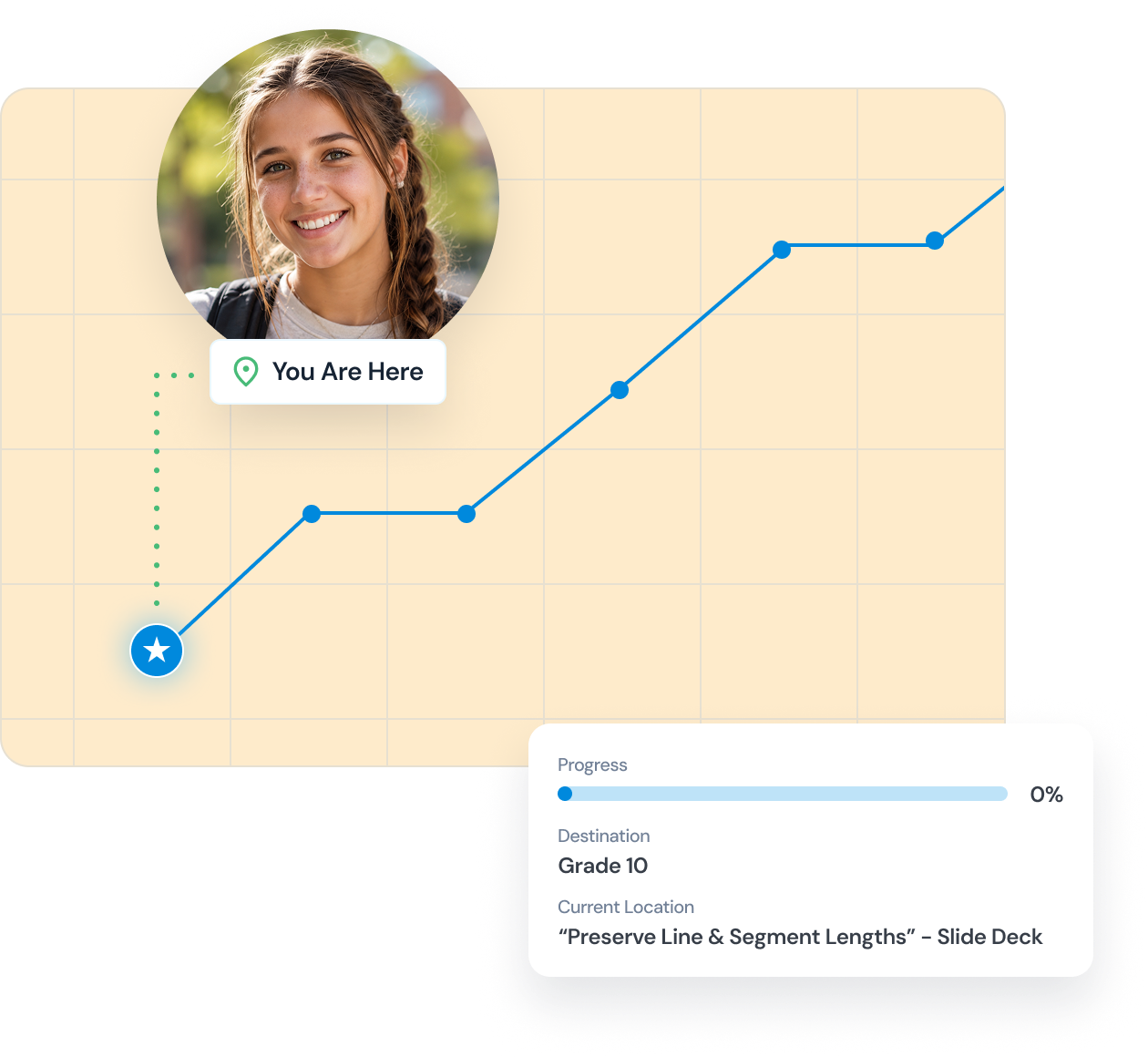
A progress chart shows a path with connected blue dots from a star icon to a smiling girl’s photo labeled 'You Are Here.' A progress bar indicates 0% progress toward the destination Grade 10. The current location is the slide deck titled “Preserve Line & Segment Lengths.”
Every Student Has a Starting Point

GPS for Learning identifies where each student currently is in their academic journey, not just where grade-level standards say they should be.

That honest starting point is where meaningful progress begins.
A Personalized Path Forward

From that starting point, GPS for Learning recommends a personalized learning pathway tailored to each student's unique needs, gaps, and goals.

No two students get the same path because no two students are the same.
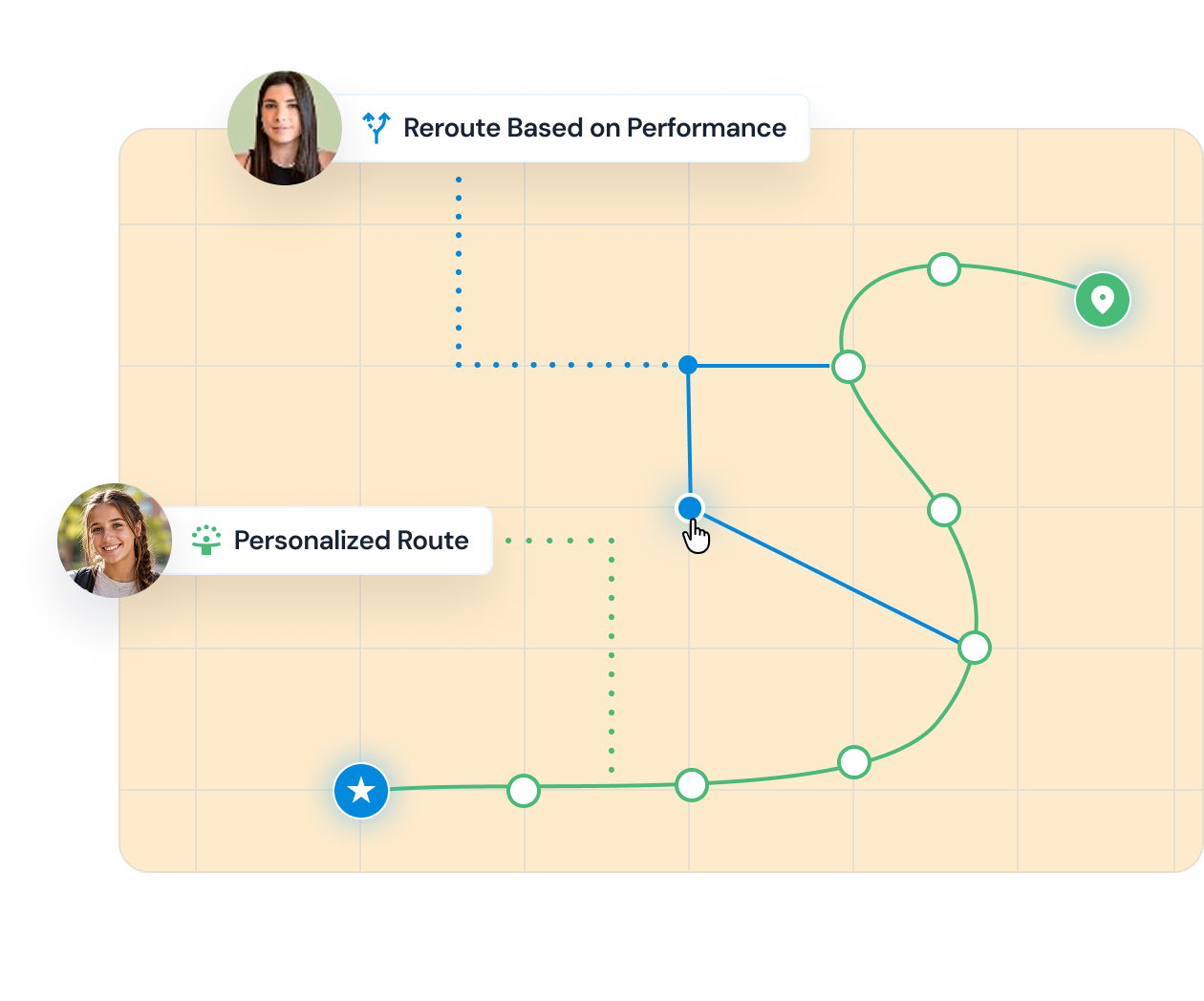
Map graphic showing two routes from a blue starting point marked with a star to a green destination marker: a green curved path labeled Personalized Route with user icon at bottom left, and a blue angular path labeled Reroute Based on Performance with user icon at top left.
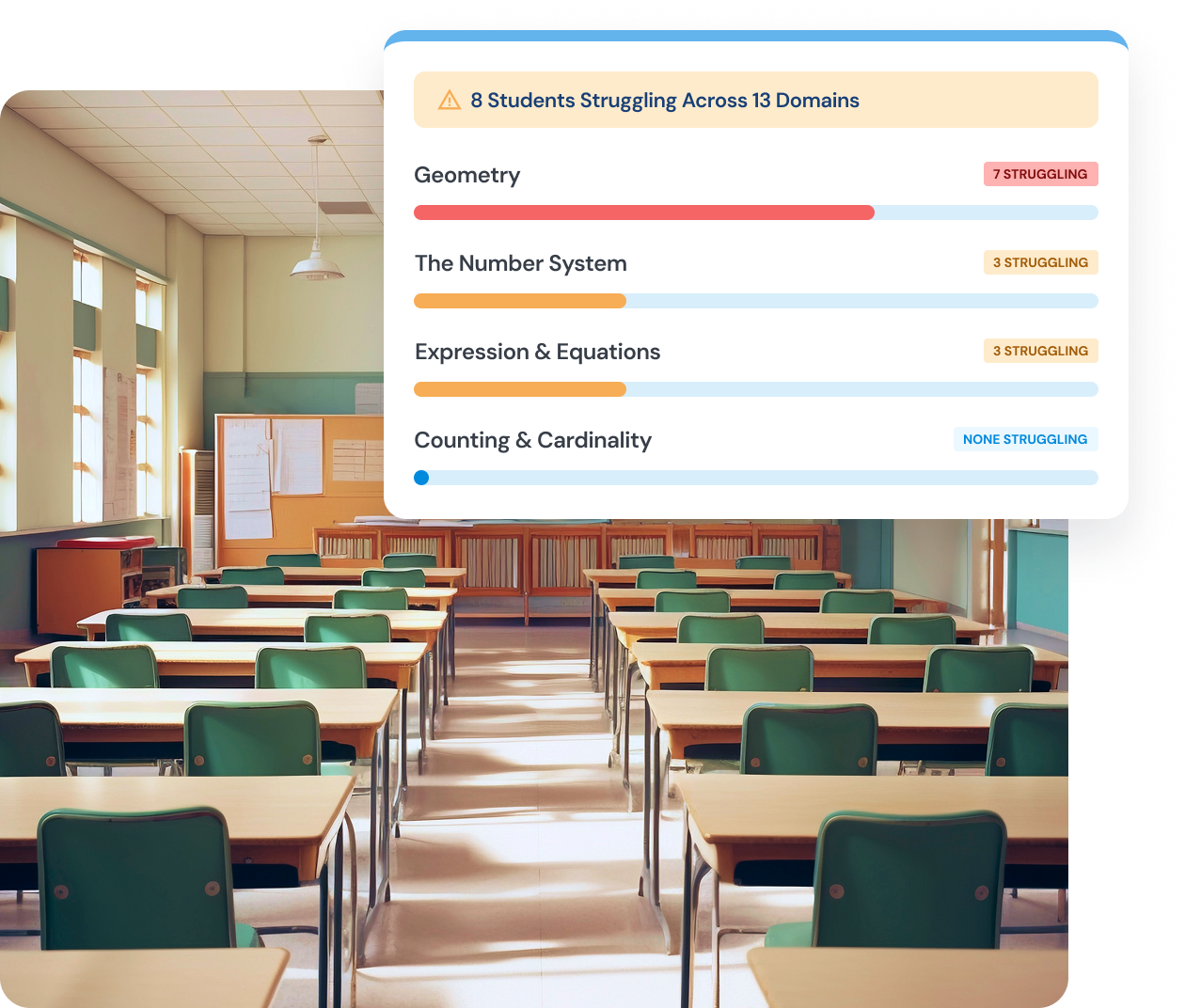
Empty classroom with rows of green chairs and wooden desks bathed in natural light from tall windows, overlayed by a graphic showing student struggles across four math domains: Geometry with 7 struggling, The Number System and Expression & Equations each with 3 struggling, and Counting & Cardinality with none struggling.
Real-Time Visibility for Teachers

Teachers see the full picture of their class at a glance, including where each student is progressing, where they are falling behind, and what they need next.

Less time analyzing data, more time teaching.
AI That Guides Evidence-Based Instruction & Intervention

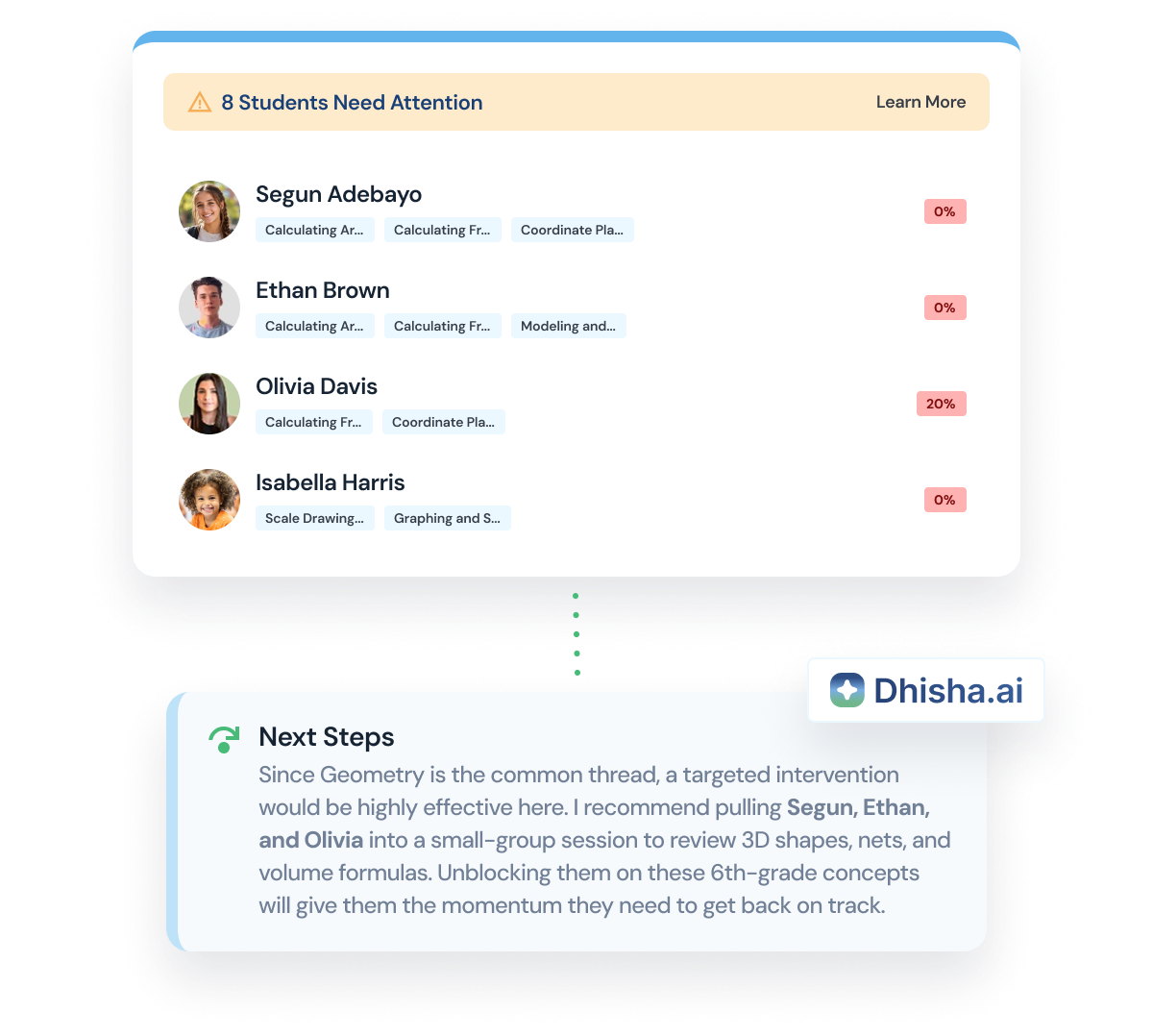
GPS for Learning uses AI to analyze each student's data and surface clear, actionable next steps for instruction and intervention.

No guesswork. No manual review. Just a clear path from where the student is to where they need to go.
Dashboard showing 8 students needing attention with a list of four students: Segun Adebayo, Ethan Brown, Olivia Davis, and Isabella Harris, each with associated skill tags and low progress percentages in red. A next steps section recommends a targeted intervention for Segun, Ethan, and Olivia on 6th-grade geometry concepts to help them get back on track. The image includes the Dhisha.ai logo.
Smiling teenage girl with braided hair and backpack, surrounded by labels reading Wellbeing, Academic, Past Interventions, and Attendance, and a chart below marking a 'Current Location' point on an upward curve.
Connected to the Whole Child

GPS for Learning does not exist in isolation.

Academic progress data feeds directly into MTSS workflows, connecting learning gaps to the broader whole-child support picture already inside Cascades.
Measurable Progress Over Time

Track student growth from the starting point forward.

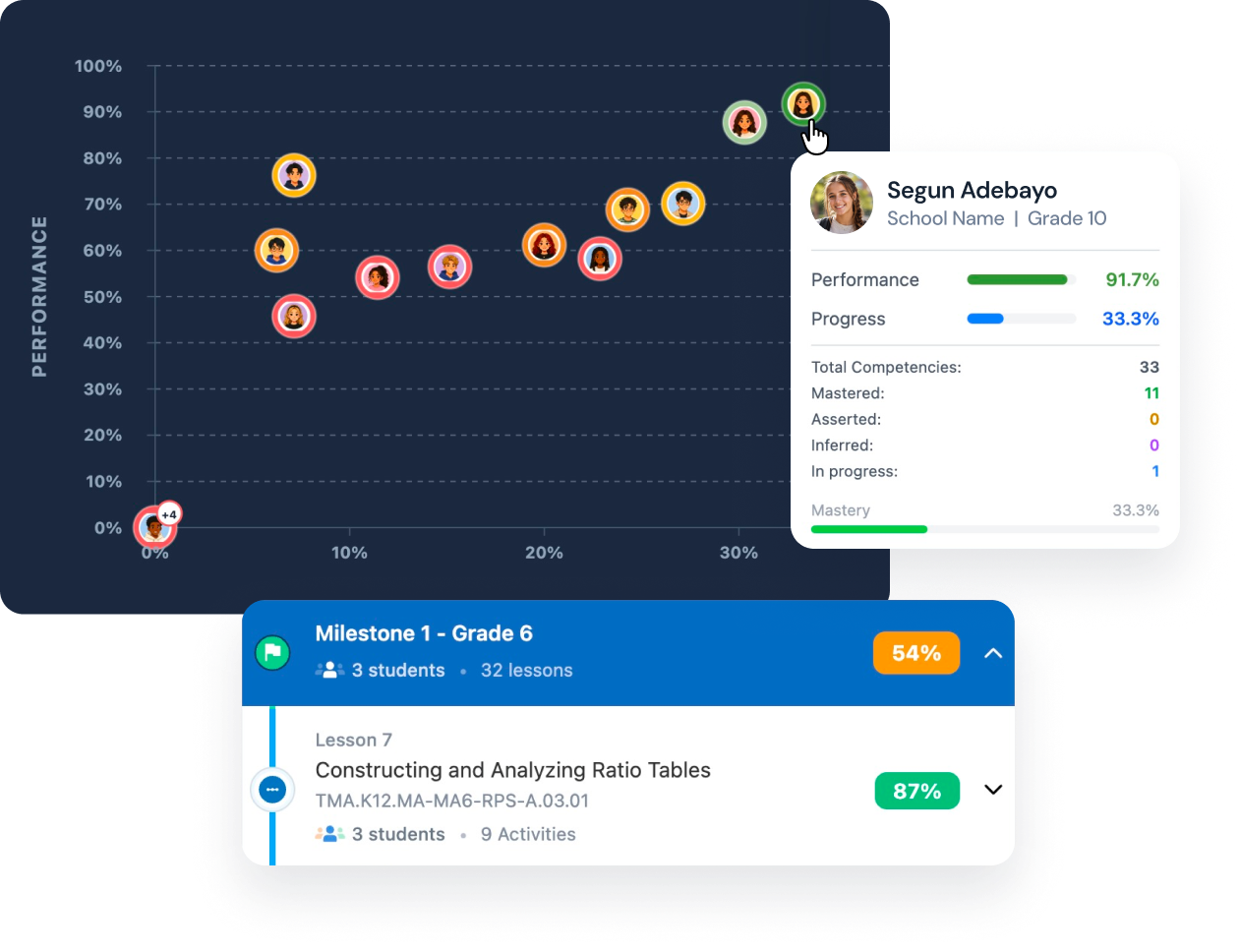
Progress monitoring is built in, giving teachers, administrators, and support teams a clear, ongoing view of whether the path is working.
A scatter plot chart showing student performance versus progress with face icons representing individual students. Performance is on the vertical axis from 0% to 100%, and progress is on the horizontal axis from 0% to 30%. One student's detailed info is highlighted: Segun Adebayo, Grade 10, with 91.7% performance and 33.3% progress, mastering 11 of 33 competencies. Below the chart is a progress summary for Milestone 1 in Grade 6 showing 3 students and 32 lessons, highlighting Lesson 7 on Constructing and Analyzing Ratio Tables with 3 students and 9 activities, and progress rates of 54% for the milestone and 87% for the lesson.
Support that doesn't end at launch

Our team is your partner for the journey.

Track student response over time, address disproportionalities in access to resources, and drive measurable whole-child outcomes across your district.
Group of people sitting in modern lounge chairs having a meeting.
We Learn Your District Before We Configure Anything.
Implementation starts with us sitting down and understanding how your team actually works, so the setup fits your reality, not the other way around.
A Guided Roadmap From Day One to Fully Up and Running.
Our built-in onboarding module walks your team through every step with less friction, so staff spend less time on logistics and more time using Cascades to help students.
You Get a Person, Not a Ticket System.
When something comes up, you hear directly from someone who already knows your district, your staff, and your students. Not a support queue.
The Same Partner Who Onboarded You Is Still With You a Year Later.
No handoffs. No fixed playbook. The same person who shaped your setup continues to adjust and fine-tune alongside your team as your needs evolve.

Decision support, built in.

Every Cascades product is powered by Dhisha.ai, AI decision support that treats every student as a unique learner, improving efficacy and capacity by guiding your team through every step of the tiered support process.

The goal is not one more dashboard.

The goal is a coherent picture that helps a trusted adult know what matters next.
Testimonials

From the people we serve.

“Cascades has provided the District an efficient way to analyze key data to determine student support and intervention, caseload management, and system-level efficacy, allowing for nimble problem solving. Its data-analysis efficiency gives our staff more time to provide direct support for students.”
Dr. Adam Bayne
Superintendent, Holton Public Schools
“Our data lived in silos. We had abundant information but could not see how it connected. Now our multidisciplinary team examines student needs across every category in one place. It is no longer a guessing game about what occurred or what we should address first.”
John Crocker
Director of School Mental Health & Behavioral Services, Methuen Public Schools
Smiling man in a black suit jacket, light blue shirt, and green tie standing outdoors in front of a brick wall and blurred trees.
“Cascades drove our alignment and improvement process for our tier system. Our referral workflow now takes three to four minutes and the communication loop is finally closed. Now we have a clearer picture of whether our supports are actually working.”
Smiling man with short brown hair and beard, wearing a beige plaid shirt, standing outdoors with blurred autumn trees in the background.
Joshua Glick
MTSS Director & Athletic Coach, Holton Public Schools

Ready to move from scattered data to coordinated support?

Request a personalized demo today.

Contact our team about booking your personalized demo today.

Start with a conversation.

See how Cascades can give your team a clear Whole-Child view and more time for direct student support.

Keep exploring the Cascades product suite.

FAQ

Cascades questions?
We’ve got answers.

Are the interventions that you showed defined in Cascades or are these specific to the school or district?

Cascades provide a pre-defined list of 60 evidence-based interventions to choose from. This is the default set of options. During implementation, if a school district has additional interventions, we can add those to the list.

Can Cascades track root causes/reasons for student absences, beyond just the general absence codes they currently use?

We display absence type (excused and unexcused) and corresponding reason that we receive from the SIS. While Cascades does not pinpoint root cause, the Whole Child page is designed to provide insights on corelating factors that might be contributing to student absences.

Can the Cascades platform enhance district's existing MTSS process and workflow?

Yes, Cascades workflow is designed to advance best practices and improve maturity and fidelity of the MTSS process.

Can the Cascades platform integrate with other data sources, for example, behavior referrals from SWIS?

Yes, Cascades can pull in data from SWIS behavior referrals, standardized tests such as Acadience, iReady, NWEA/ MAP, CAASSP and mental health universal screening tools.

Can we override the tier recommendation made by the MTSS team?

Yes, the interventionists can override the tier recommendation made by the MTSS team. The intake process is designed to provide as complete an understanding of the student as possible to aid the interventionist in making their best professional judgement on the right tier and supports needed.

Can you subdivide risks based on the four domains you mentioned (academics, attendance, behavior, mental health)?

Yes, the risk identification is domain specific. We can identify risks in each of the four domains independently. During implementation, we review our default early warning rubric for each domain, if required, the school district can adapt this to match their policies.

Could Cascades generate the required truancy notification letters automatically, rather than having schools do it manually.

Cascades has a Truancy Report feature that continuously monitors students that become truant in the preceding 20/40/60/80 days. However, we currently do not have a parent notification feature.

Could the attendance insights and analytics in Cascades help identify actionable items the district could address, beyond just surfacing the attendance data?

The combination of key insights from universal screening aggregate data, behavior/ ODR aggregate data, and attendance data is designed to provide district wide/ building wide action items.

Does Cascades have progress monitoring features to track student interventions over time?

Yes, Cascades has built-in progress monitoring features to schedule check-ins and track student progress on interventions over time. We offer an integrated progress monitoring approach for academic, behavior, and social emotional/ mental health interventions.

Does the system compare demographic data to identify disproportionalities?

Yes, the system has ready-made dashboards and widgets specifically to understand disparities or disproportionalities in areas of disciplinary practices and provision of intervention support based on gender, race and special education needs.

Does the system integrate with the state's SAP (Student Assistance Program) and IBHS (Intensive Behavioral Health Services) referral processes?

SAP counselors can be assigned as an external interventionist within Cascades, and the process flow supports data integration and referral process. End of year state SAP reporting is something that can be easily supported since all referral and progress monitoring data is native to Cascades.

How does Cascades handle data related to students with IEPs?

IEP process and outcomes remain separate from Cascades, but the system can indicate if a student has an IEP and allow for referrals and interventions for those students within the MTSS framework.

How does the Cascades platform differ from Branching Minds?

Cascades is designed as MTSS operating system that integrates mental health, behavior and SEL, academics and attendance referrals and interventions. We take a whole child approach and incorporate social determinants and vulnerabilities data. We differentiate ourselves with the intake protocols and progress monitoring for Tier 2/3 interventions and supports provided by internal and external interventionists.

How does the Cascades platform handle assigning interventions and notifying interventionists?

The MTSS team can assign interventions to multiple interventionists (internal and external) for any given referral. All interventionists get automatically notified.

How does the Cascades platform's intervention management and progress monitoring compare to what the district is currently doing with Qualtrics?

Cascades provides a more unified user experience compared to using multiple systems like Qualtrics. It centralizes and streamlines all the data, referrals, and progress monitoring and integrates progress monitoring for academic, behavior and social emotional/ mental health needs.

How frequently does Cascades refresh/load data?

Student roster, attendance, office discipline referrals, and academic grades load into Cascades on a nightly basis, while the universal screening and standardized test data follows the administration cycle.

Is there a way to print parent-friendly reports that compile the student data?

We currently do not have a Parent persona to access Cascades. However, Cascades pages such as the whole child view can be printed as PDFs and shared with parents.

We would like to limit who sees what information about a student. How could Cascades support our needs?

Cascades has robust persona/ role-based security where you only see data based on ‘legitimate educational interest’. - Teachers get to see only their roster of students. - Interventionists get to see only the buildings they support. - Administrators/MTSS leads see students based on their scope of responsibilities. In addition to this design, Widgets that you see on the outcomes dashboard and whole child page can be turned off for specific persona/ role based on school district policy and/or culture.

What kind of training and support is provided for using the Cascades platform?

Cascades professional learning is based on user persona. Typically, the hand on professional development takes between 1 and 3 hours based on persona. Cascades also has built in micro learning video tutorials and training resources for personas like teachers, interventionists, and the MTSS team. These 3–5-minute videos can be accessed any time as a refresher.

What primary data are schools inputting directly into the Cascades system versus integrating from their other systems?

The referral process, interventions and goals setting, progress monitoring are the only data schools would input directly into Cascades. All student roster, attendance, academic grades, and office discipline referrals will directly show from the school's SIS.

When putting in a referral, is any of the student data already populated?

Yes, all the student data is pre-populated from the SIS system. The only input is the referral details from the person making the referral.

Would schools be able to upload documents like student attendance improvement plans into the Cascades system?

Yes, student specific documents can be uploaded as part of the referral process, intervention intake process and progress monitoring process.

One System. Four Connected Solutions.

Compare the connected solutions for MTSS, screening, personalized learning, and itinerant service coordination.